
BitTool WalletBitTool SignerSecurityDevelopersOpen SourceDownload
BitTool Signer

Air-gapped signing. For everyone.

BitTool Signer turns a spare iPhone or Android phone into an offline signing device. Your keys are created and kept on that phone, every request is decoded before you sign, and signatures leave only as QR codes.

Zero network connections Fully open source Free
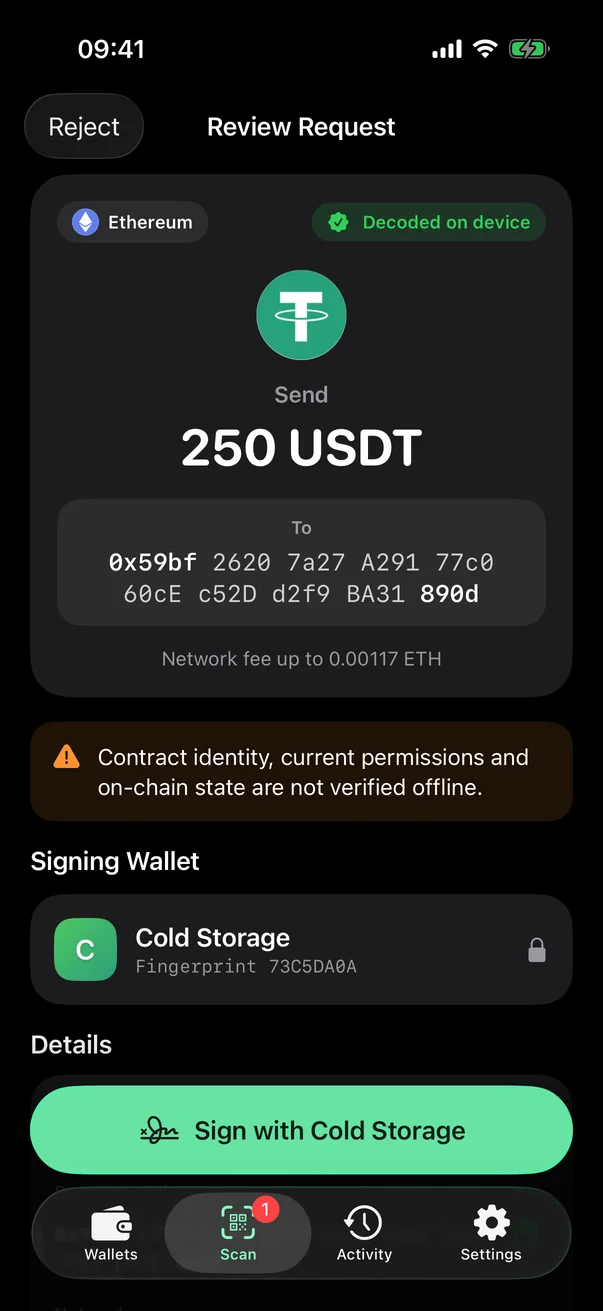
BitTool Signer reviewing a USDT transfer before signing
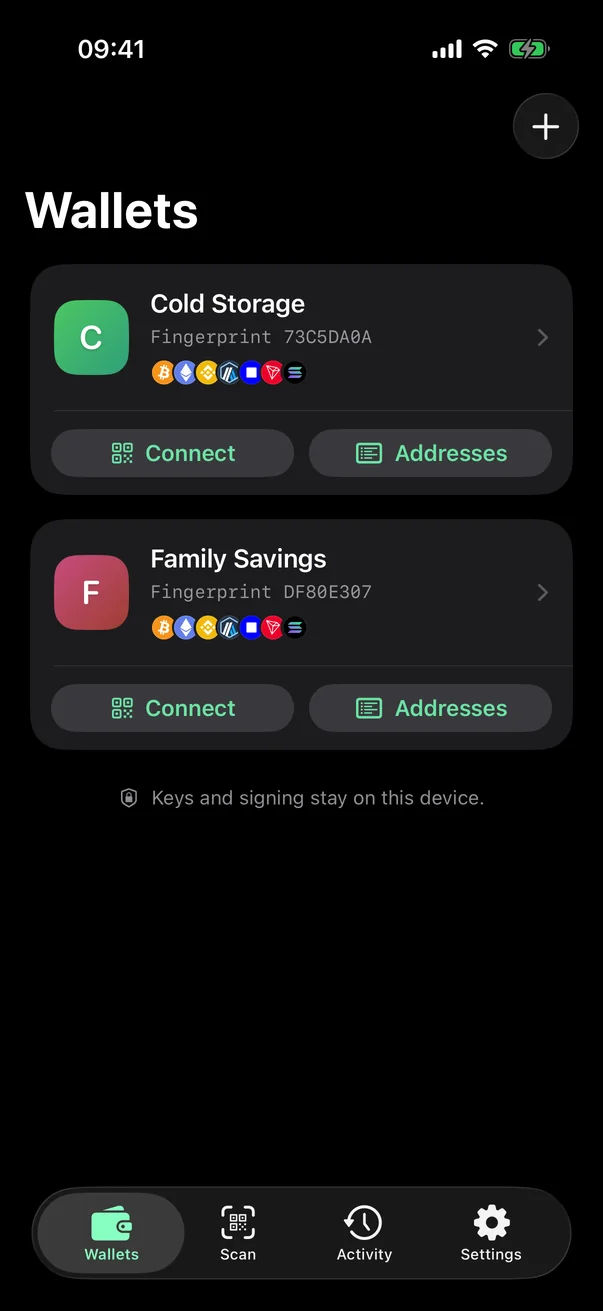
BitTool Signer wallet list
Decoded on deviceBefore you sign
Airplane ModeWorks fully offline
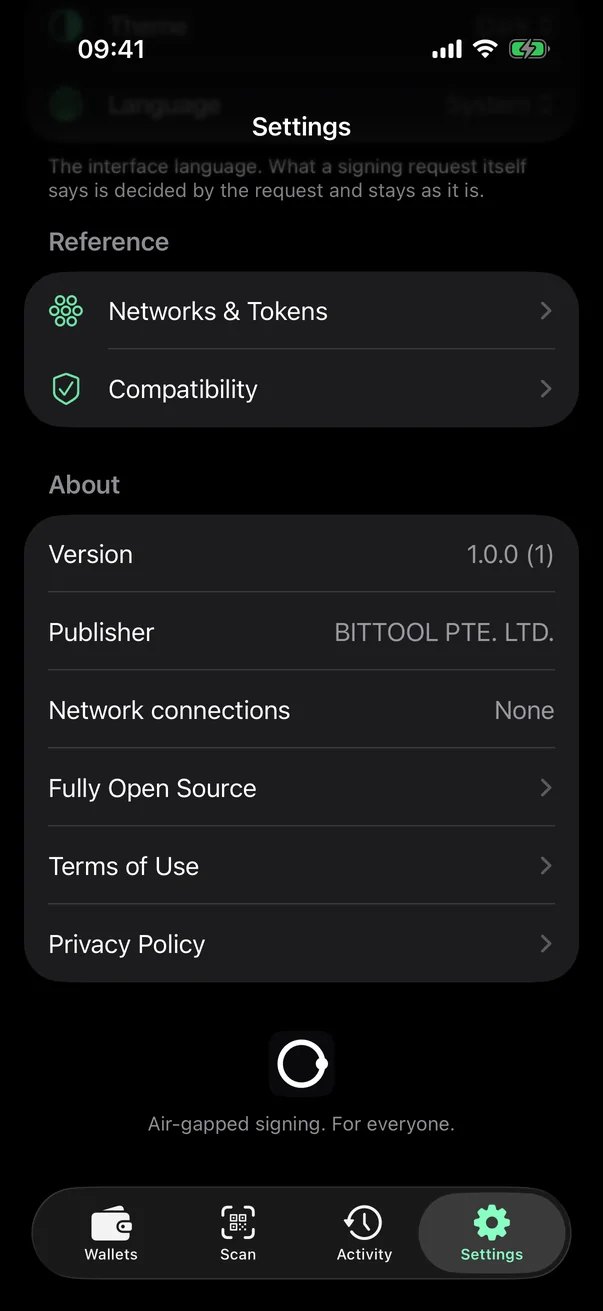
0network connections — the app contains no networking code
600,000PBKDF2 rounds protect each wallet password
2 layersof AES-256-GCM: your password, plus a key that never leaves this phone
3,350tokens on 10 networks, recognised fully offline
Offline by design

Built never to go online.

BitTool Signer has no servers to talk to and no code to talk with. It is meant to run in Airplane Mode on a phone that does nothing else.

  • No networking codeThe app contains no networking code, and on Android it does not even request the Internet permission, so it cannot send or receive anything.
  • No accounts, servers or cloud syncNothing to sign up for and nothing to sync. Your wallets exist only on this phone.
  • Kept out of backupsEncrypted wallet files are excluded from cloud and computer backups. Your written recovery phrase is the backup.
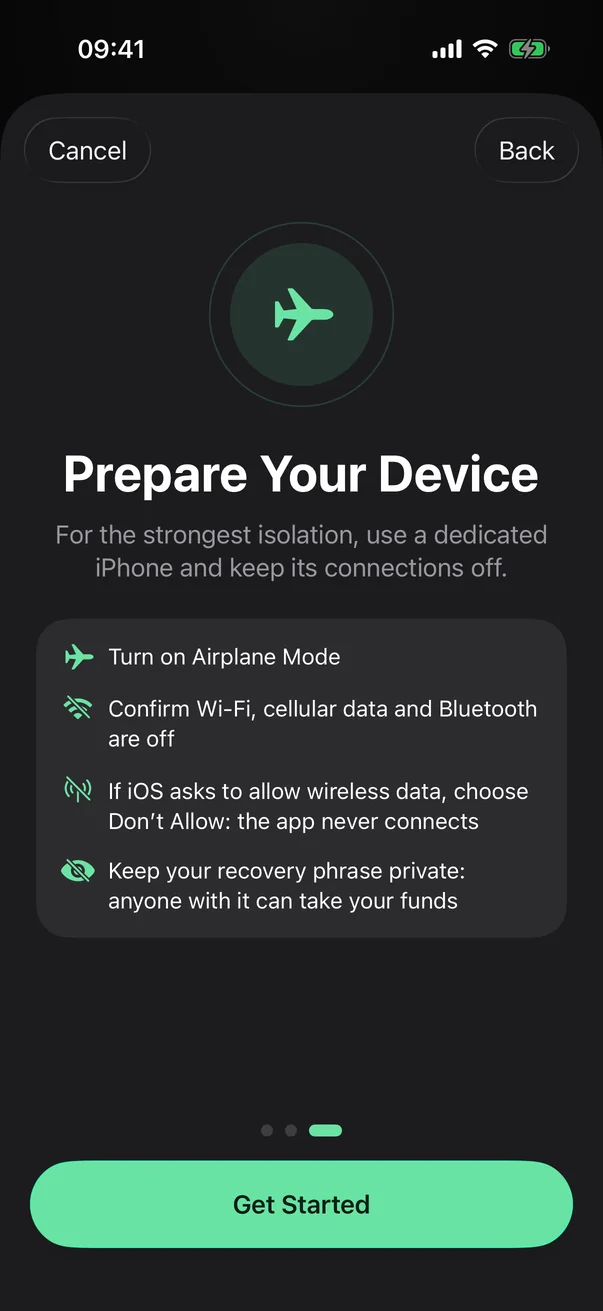
  • A guide for a dedicated deviceBuilt-in steps help you prepare a phone for signing: Airplane Mode on, Wi-Fi, mobile data and Bluetooth off.
BitTool Signer settings showing no network connections
BitTool Signer guide for preparing an offline device
Review before you sign

See exactly what you're approving.

Every request is decoded on the device and matched to the wallet that should sign it. Nothing is signed until you have seen it.

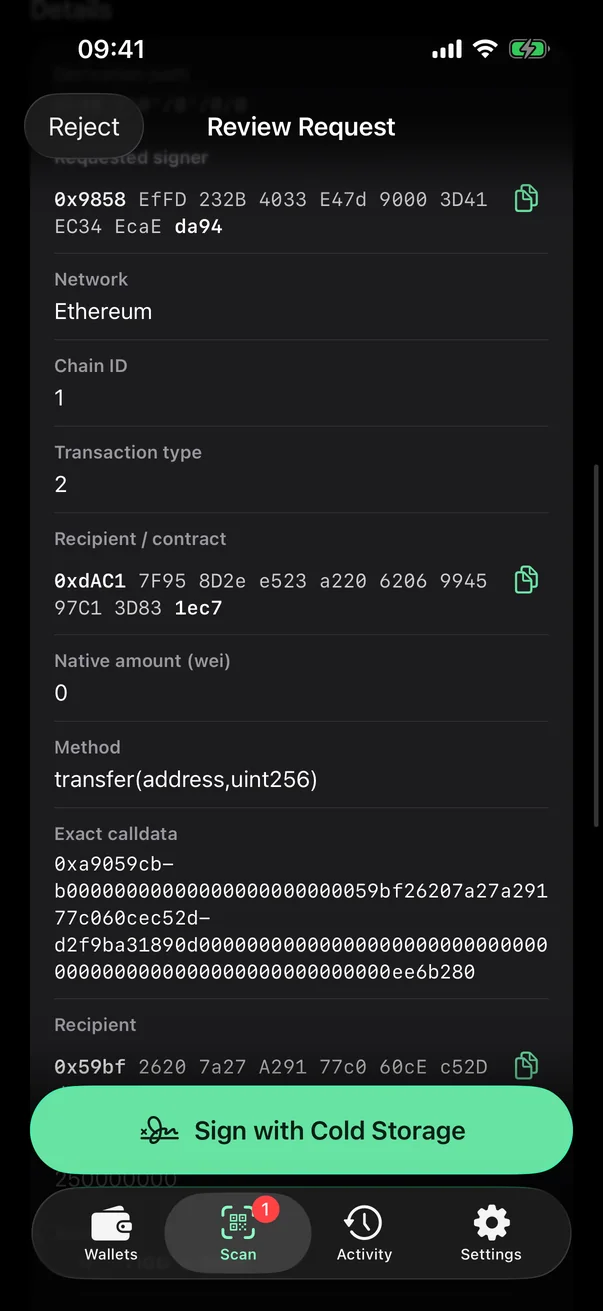
  • Decoded on deviceAmounts, recipients, contracts and fees, plus the exact bytes and a fingerprint of the request.
  • Plain-language warningsUnlimited approvals, unknown tokens, message signatures and other red flags are called out before you continue.
  • NFT-awareTransfers, approvals and marketplace listings on Seaport, LooksRare, Blur and Solana show what you give, what you get and who else receives.
  • A password for every signatureNo global unlock and no remembered sessions. Each signature needs that wallet's own password.
Decoded USDT transfer in BitTool Signer
Every field of the transaction, including the exact calldata
How it works

Four steps. Only QR codes cross the gap.

Pair once with a watch-only wallet such as BitTool Wallet. After that, every transaction follows the same simple loop.

01
Once

Pair

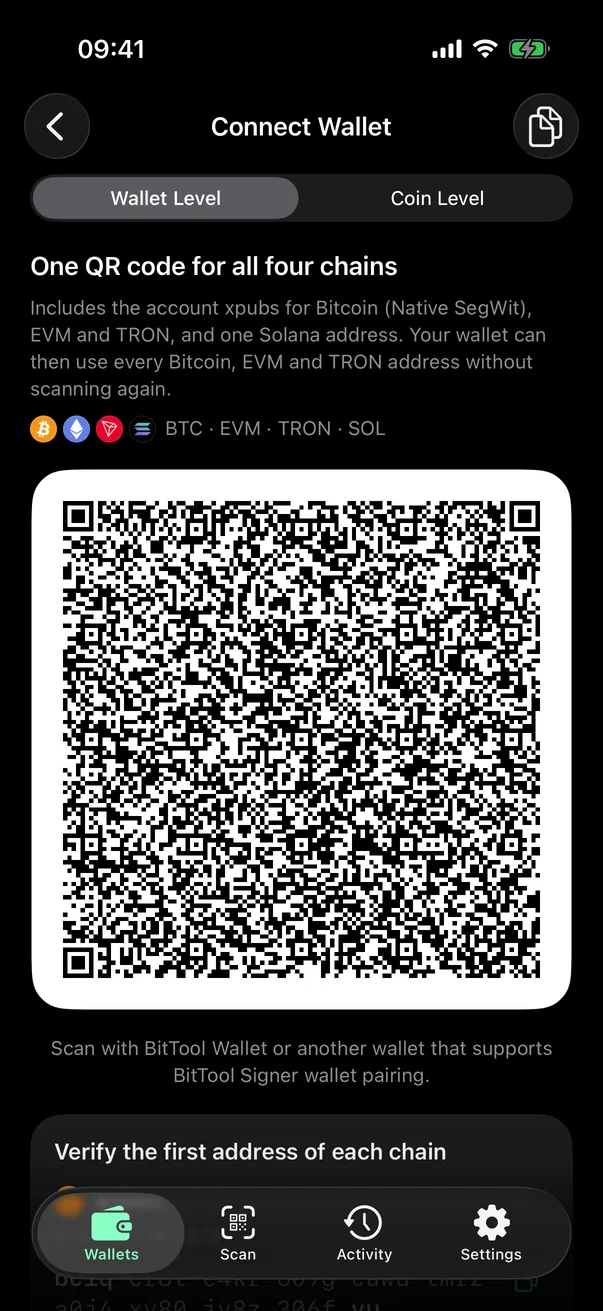
Show your wallet's public keys as a QR code. Your watch-only wallet imports them to track balances.

Wallet-level pairing QR code
02
Offline

Scan

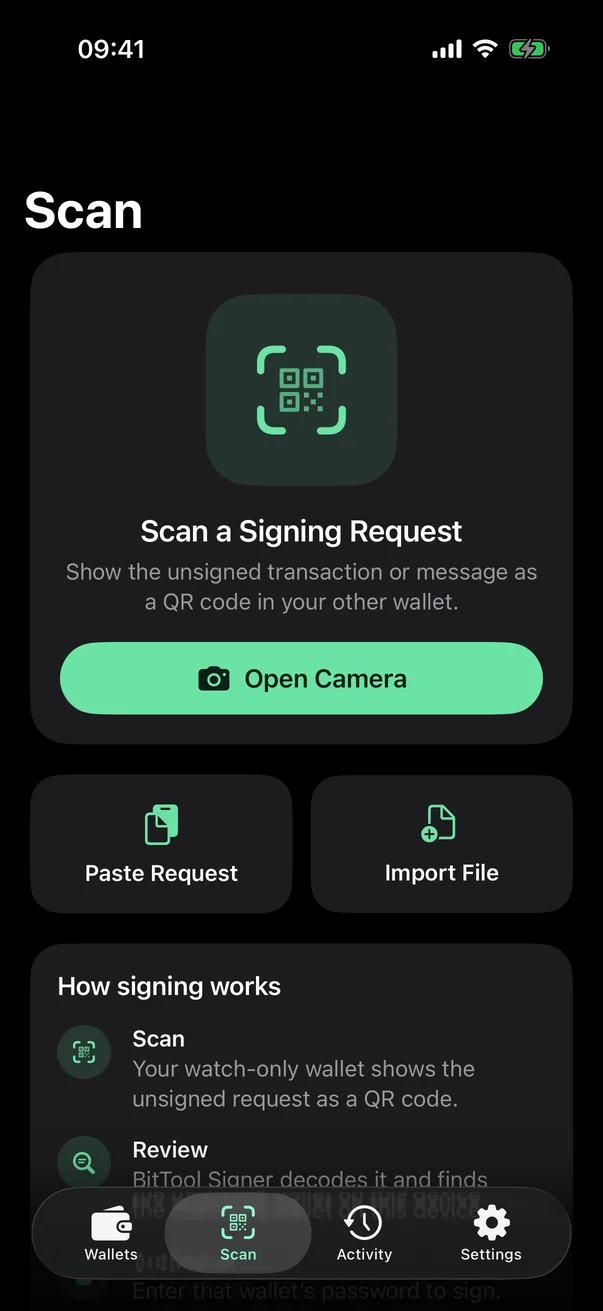
Your watch-only wallet shows the unsigned transaction as a QR code. Scan it with BitTool Signer.

Scan a signing request
03
Offline

Review & authorize

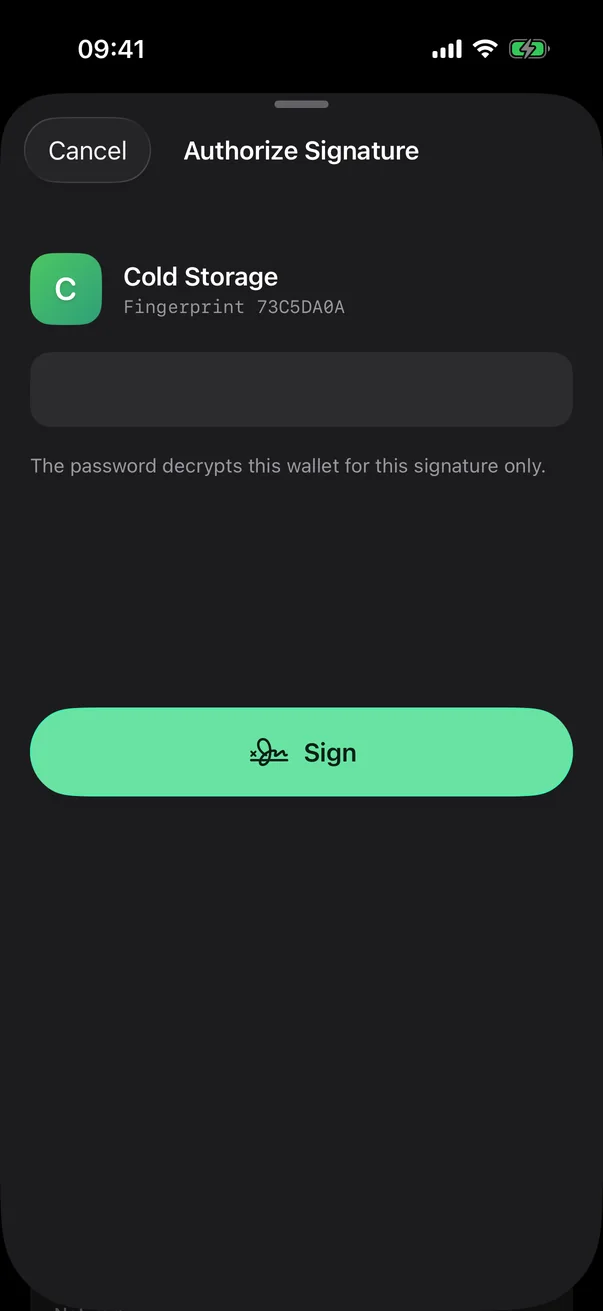
Check the decoded details, acknowledge any warnings and enter the wallet's password.

Authorize the signature with the wallet password
04
Offline

Return the signature

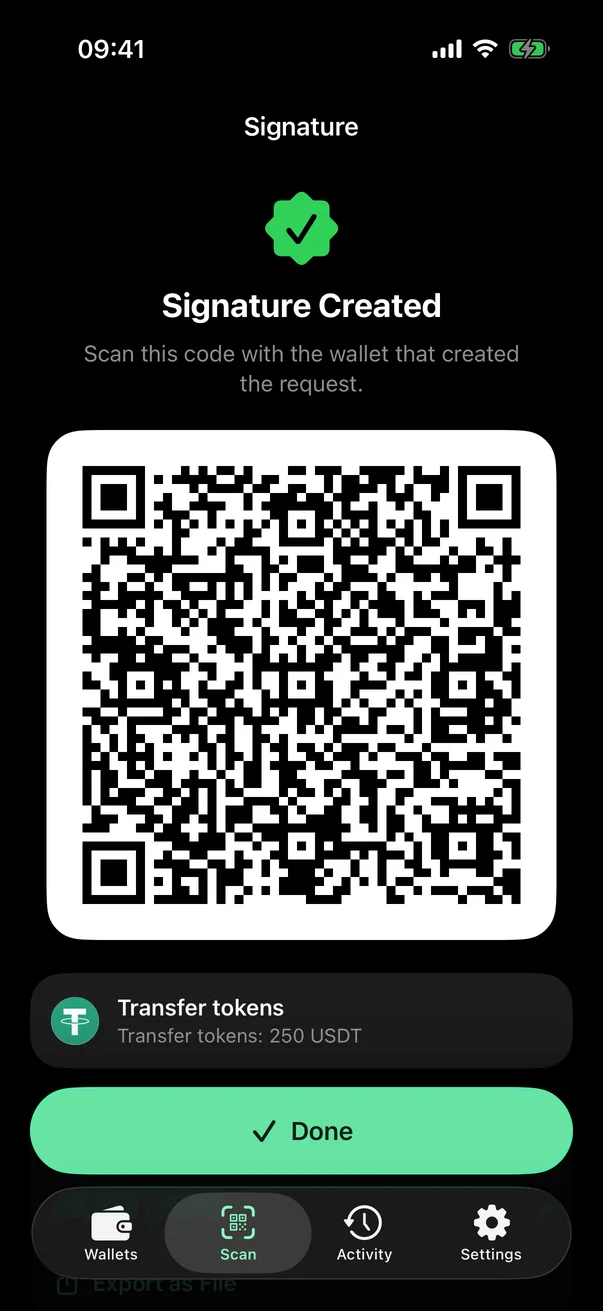
BitTool Signer shows the signature as a QR code. Scan it back into your wallet to broadcast.

Signature shown as a QR code
Backup

A backup flow that respects your secret.

Your recovery phrase is the only way back into a wallet. BitTool Signer helps you write it down correctly — and keeps it hidden the rest of the time.

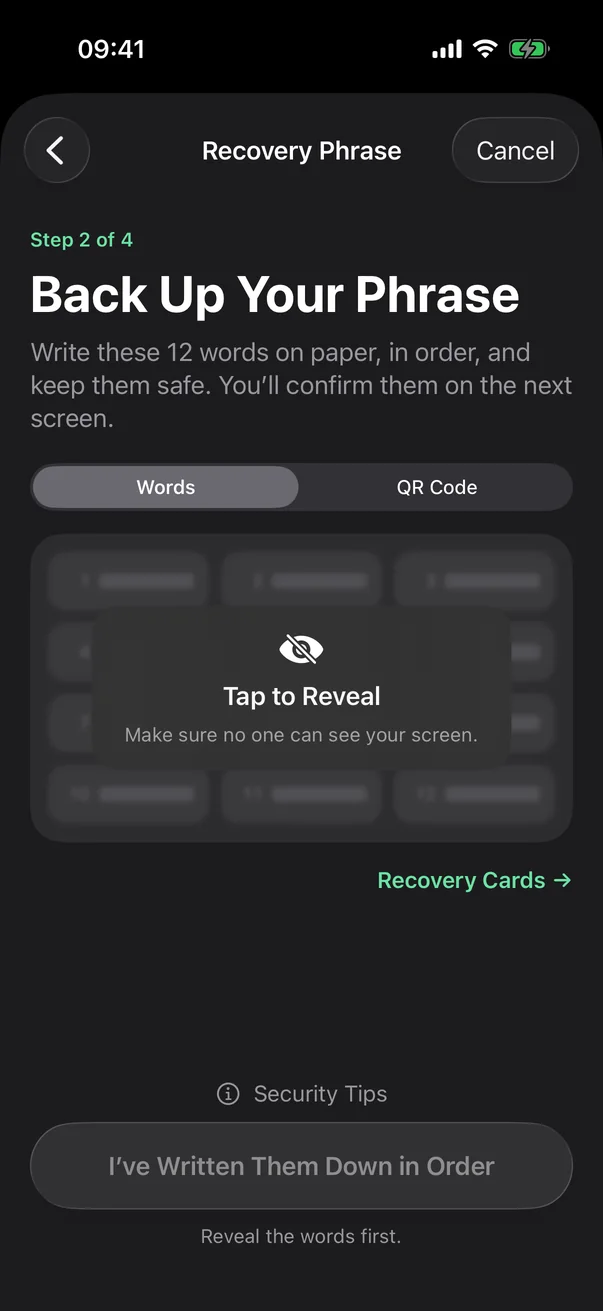
  • Concealed until you tapWords and QR codes stay hidden, and hide again when you leave the screen, switch apps or start a recording.
  • Checked before you continueFill in the missing words in order, so you know the backup is complete before you rely on it.
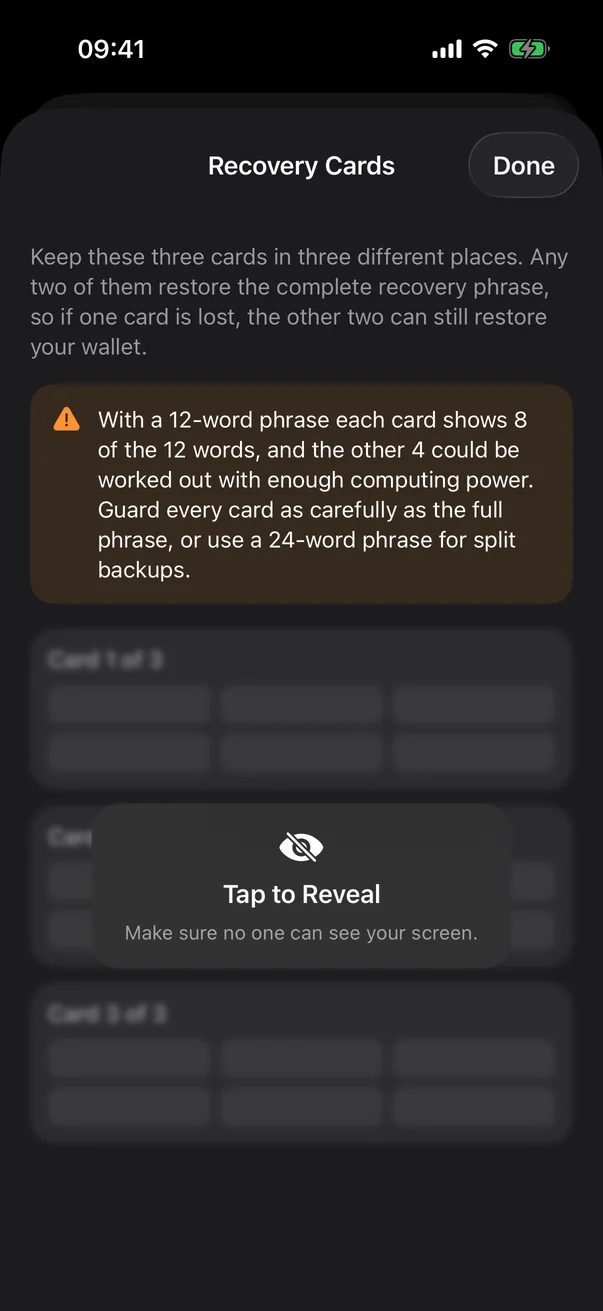
  • Recovery cards, two of threeSplit the phrase across three cards and keep them in different places. Any two restore the wallet.
  • All ten BIP39 languagesImport phrases in English, Chinese, Japanese, Korean, Spanish, French, Italian, Czech or Portuguese, with checksum validation.
Concealed recovery phrase
Recovery cards, two of three
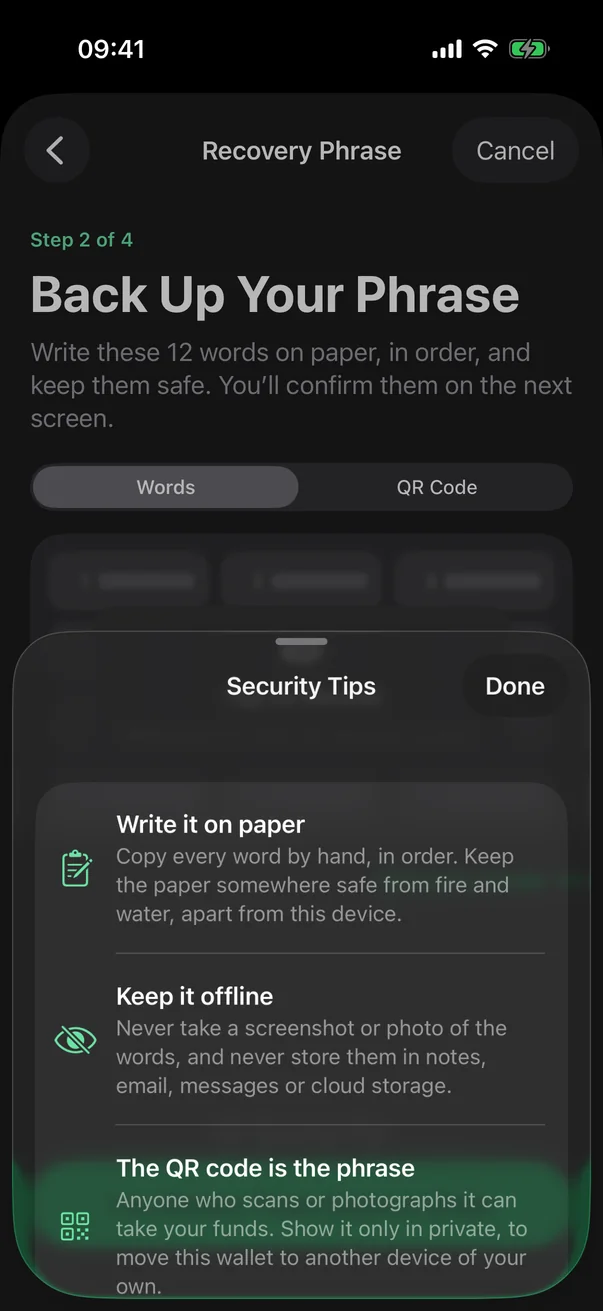
Security tips for the recovery phrase
Networks

One device for every key you hold.

Bitcoin with every common address type and multisig, Ethereum and the major EVM networks, TRON and Solana — all from a single recovery phrase.

Bitcoin

Native SegWit, Taproot, Nested SegWit and Legacy. PSBT signing and multisig cosigner keys.

Ethereum & EVM

Ethereum, BNB Chain, Arbitrum and Base. Transactions, personal messages and EIP-712 typed data.

TRON

TRX and TRC-20 tokens, with any address index you need.

Solana

Transactions and messages, with the Standard, Trust and Legacy derivation paths.

Compatibility

Works with the wallets you already use.

BitTool Signer speaks open standards — BC-UR, PSBT and EIP-4527 — so it pairs with BitTool Wallet and many popular wallets.

Scan to signPair + sign

Import BitTool Signer's keys, then send requests by QR code and scan the signatures back.

All four chains in one QR code
BitTool Wallet
Bitcoin
Sparrow BlueWallet Nunchuk Bitcoin Keeper BULL Bitcoin Specter Bitcoin Safe ZEUS
EVM
MetaMask Rabby imToken TokenPocket Ambire
Solana
Solflare Helium Wallet

Watch onlyView balances

Import an address to follow balances. These wallets can't send requests to BitTool Signer for signing.

Bitcoin
BlueWallet Electrum
EVM
Rabby TokenPocket OKX Wallet Trust Wallet
Solana
Phantom Backpack Jupiter OKX Wallet TokenPocket
TRON
TronLink TokenPocket OKX Wallet OneKey

Compiled from each wallet's public documentation and source code. A listing is not an endorsement or a certification: wallets change, so always compare the first address before you receive funds. Names and logos belong to their respective owners.

Does your wallet read BitTool Signer's QR codes? Send us the details and we will add it to the list. Anyone can submit a wallet, including its own developers.

Submit a wallet

Submit a wallet

Does your wallet read BitTool Signer's QR codes? Send us the details and we will add it to the list. Anyone can submit a wallet, including its own developers.

Email

Tosupport@bittool.com
SubjectAdd supported wallet

Include at least

  • Wallet nameThe name as it is published.
  • Official websiteThe address the wallet itself publishes.
  • App iconA link to the image, or attach it. A square icon of at least 512 px.
  • Source codeA link to the repository, if the wallet is open source.
  • QR formats supportedWhich of these the wallet reads: Wallet Level, and Coin Level for Bitcoin, EVM, TRON or Solana.

Being listed is not a review or an endorsement. We do not audit the wallets people submit, and BitTool is not responsible for what happens through them.

Security reviews

Reviewed before release. Published in full.

The source code of BitTool Signer 1.0.0 was examined by two AI-assisted security reviews on each platform, each run on its own. None found a Critical or High issue; the Android reviews found Medium issues, listed below. All four reports are published unedited, including what they could not check.

BitTool Signer for iPhone · version 1.0.0

Opus 5

19 October 2026 · tag v1.0.0 · 17 pages

Self-review
0Critical 0High 0Medium 1Low 3Informational
  • Six independent checks tie every signature to the exact bytes the user reviewed, confirmed by running them.
  • 4,000 deliberately malformed QR inputs, every one refused safely.
  • The signing engine rebuilds byte for byte from the tagged source, and the app links no networking framework.

Open, LowThe extra confirmation for high-risk requests is enforced by the app's interface, but not yet by the engine itself. The report recommends fixing it in 1.0.1.

Download the report (PDF)


GPT-6 Astra

18 October 2026 · report R3 · 16 pages

Third round
0Critical 0High 0Medium 1Low 4Informational
  • Recovery phrases come from the iOS secure random generator. Any error stops wallet creation, with no weak fallback.
  • The High finding of the previous round, about Safe multisig transactions, and its two Low findings were verified as fixed.
  • 210 engine tests and 177 app tests passed; 1,509 protocol mutation cases showed no anomaly.

Open, LowA Bitcoin transaction that burns coins and also returns change can be summarized as "every output returns to your wallet" on the result screen and in Activity. The signing screen itself shows the burn and its amount correctly.

Download the report (PDF)

BitTool Signer for Android · version 1.0.0

Opus 5.5

25 October 2026 · release 1.0.0 · 8 pages

Self-review
0Critical 0High 4Medium 9Low 11Informational
  • No password bypass, no way to sign anything but the reviewed and matched request, and no path that extracts the recovery phrase or private keys.
  • No Internet permission and no networking code. Screens stay out of screenshots and Recents, and backups and device transfer are excluded.
  • 2,075 app tests and 217 engine tests passed, and the engine rebuilt from source is byte-identical to the copy inside the APK.

Open, MediumA Solana authority change or delegation sent together with a tiny transfer is summarized as that transfer (its warnings and the risk acknowledgement remain); Bitcoin change is accepted at any address index, where watch-only wallets may not look; and the release signing key was kept on the development machine. The report recommends fixing these three before the app protects valuable wallets.

Download the report (PDF)

GPT-6 Astra

24 October 2026 · pre-release commit e7e71fb · 7 pages

Re-audit
0Critical 0High 1Medium 1Low 1Informational
  • Three earlier findings verified as fixed: overlay-proof Sign and risk controls, wiping of secrets when an operation is cancelled, and resuming an interrupted QR scan.
  • Only the wallet password authorizes a signature. Biometric App Lock never does, and stale work is dropped after a cancellation.
  • 1,616 Android tests passed, the engine rebuilt byte for byte, and the release build has no network permission.

Open at that revisionA tiny Solana transfer could hide a burn or an authority change in the summary, and a Bitcoin burn with change could read "every output returns to your wallet". The report advised holding a general release for valuable wallets. The later Opus 5.5 review of the release found the burn cases fixed; the authority case remains as its first Medium finding.

Download the report (PDF)

These are AI-assisted reviews, not audits by a security firm, and the Opus reviews come from the same model family that wrote much of the code. Both apps share one signing engine, so the engine findings of the Android reviews also apply to the iPhone app. An independent third-party audit has not been done yet. Every finding, and how to verify the engine yourself

Open source

Don't trust. Verify.

BitTool Signer is open source on both platforms — the apps, the offline signing engine they share and the token data. Read what it does with a recovery phrase, then rebuild the engine and compare it with the copy you installed.

security-model.txt
# BitTool Signer · how a wallet is protected
networknone# no networking code
vault.kdfPBKDF2-HMAC-SHA256# 600,000 rounds
vault.cipherAES-256-GCM# two layers
device.keyKeychain · Keystore# this device only
backupsexcluded# cloud and computer
signingfresh JS context# per request
authorizationper signature# wallet password
app.lockbiometrics# optional
screenhidden# app switcher, recording
clipboardlocal, 2 min# no Handoff

Put your keys offline today.

Install BitTool Signer on a spare iPhone or Android phone, switch on Airplane Mode, and pair it with BitTool Wallet.

Prefer the APK?

Download BitTool Signer for Android directly from us: for a phone without Google Play, or to check the file before you install it. The app never updates itself; install a new version the same way.

Download the APK BitToolSigner-1.0.0-1000001.apk · 20.8 MB
APK file SHA-256109dbf5c622ee77672904c34a10229df3c9b0eac45b07096c510b1e1e169c2a4
Signing certificate SHA-256af41ed101765393ae89038eb4c6fc7fa96d930f6fcd76b881437a39b5a9e4631

Check both on a computer before installing: shasum -a 256 prints the file hash and apksigner verify --print-certs the certificate. The certificate never changes between releases, and Android installs an update only if it carries the same one. After installing, Settings › Fully Open Source › This build shows it too.

How to verify the APK and its signing engine
FAQ

About BitTool Signer

Is BitTool Signer a hardware wallet?

No. It is an app that keeps your keys and signing on a phone you control. For the strongest isolation, use a dedicated phone that stays in Airplane Mode and is used for nothing else — BitTool Signer is designed for exactly that setup.

What do I need to get started?

An iPhone with iOS 17 or later and a passcode, or an Android phone with Android 8.0 or later and a screen lock, plus a watch-only wallet on another phone — BitTool Wallet, or any compatible wallet listed above. The passcode or screen lock is required because the encryption key is kept in the iOS Keychain or the Android Keystore of that phone only.

Does BitTool Signer broadcast transactions?

No. It only signs. Your watch-only wallet broadcasts the signed transaction and shows its confirmation.

What if I lose the phone?

Restore the wallet from your recovery phrase on another device — in BitTool Signer or any BIP39-compatible wallet. The encrypted file on the phone is deliberately not a portable backup.

I forgot my wallet password. Can you reset it?

We can't, and nobody else can either, but you can reset it yourself with your recovery phrase. Choose "Import a Wallet" and enter the phrase (and its BIP39 passphrase, if you set one): BitTool Signer recognizes the wallet already on this phone and offers "Reset Password". The phrase is the proof, so the old password is not needed. Only the password changes; the wallet keeps its name, addresses, paired wallets and history.

Why does iOS ask about wireless data?

On iPhones sold in mainland China, iOS asks about Wi-Fi and cellular access the first time any app is opened. Choose "Don't Allow". BitTool Signer never needs a connection, and nothing stops working.

Has BitTool Signer been audited?

Version 1.0.0 had two AI-assisted security reviews on each platform, all published in full. None found a Critical or High issue; the Medium and Low findings are listed openly, including those still open. They are not audits by a security firm: an independent third-party audit has not been done yet.

Google Play or the APK?

Both are BitTool Signer for Android from us. Google Play installs and updates it for you. The APK suits a phone without Google Play, or checking the file's hash and signing certificate before installing; it never updates itself. Pick one: Android installs an update only over a copy signed with the same certificate, so keep your recovery phrase before switching.

Does BitTool Signer collect any data?

None. There is no sign-up, telemetry, analytics, crash reporting or advertising — and no networking code to send anything with. See the BitTool Signer privacy policy.